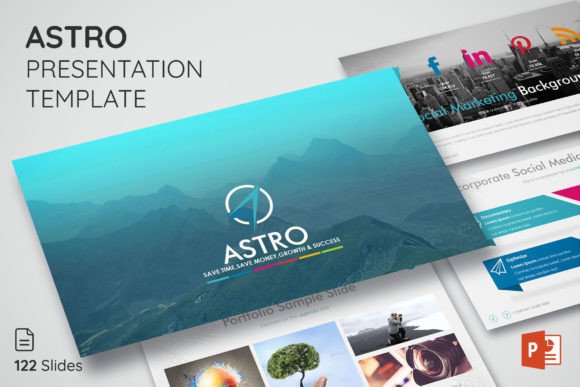
ASTRO Powerpoint Presentation Template: A Modern Design Asset
More Than Just Slides: A Visual System for Your Brand
Let's be honest, most presentation templates feel generic. They’re either too corporate or too cluttered, leaving you to spend hours wrestling with layouts that don't quite fit your message. The ASTRO Powerpoint Presentation Template is different. It’s a clean and modern template for business presentation, but its real strength is its versatility. At its core, ASTRO isn't just a collection of 600 slides; it's a comprehensive visual system designed to bring your company to the next level. Its personality is professional yet approachable, favoring balanced compositions, ample white space, and a contemporary aesthetic that communicates clarity and confidence. This isn't about flashy graphics; it's about providing a sophisticated canvas that lets your content, your brand, and your ideas take center stage.
The appeal of ASTRO lies in its thoughtful design. The layouts are built on a master slide architecture, which means every element is consistent and perfectly aligned. This creates an immediate sense of professionalism and coherence, whether you're presenting a quarterly report or launching a new product. The inclusion of five distinct color themes allows you to instantly adapt the entire presentation to your brand's identity, ensuring visual consistency from the first slide to the last. This kind of built-in brand alignment is a massive time-saver and a critical component of a strong brand identity.
Practical Applications: Where This Template Shines
Understanding where a design asset like ASTRO works best is key to unlocking its value. Its clean, modern typography and structured layouts make it ideal for a wide range of projects. For entrepreneurs and small business owners, it’s perfect for crafting investor pitches, client proposals, and internal team meetings that require a polished look. Marketers will find it invaluable for creating detailed campaign overviews, performance reports, and social media strategy decks that need to impress stakeholders. The template's clarity also makes it excellent for editorial design presentations, such as outlining a new magazine layout or a content calendar for a blog.
But its use extends beyond the boardroom. Educators, bloggers, and content creators can leverage ASTRO to design engaging workshop materials, online course modules, or keynote speeches for conferences. The drag-and-drop functionality for images means you can quickly create visually rich narratives without any technical hassle. Think of it as a toolkit for web design mockups, a framework for packaging design proposals, or a sleek way to present logo design concepts to a client. The template’s neutral yet stylish foundation allows it to adapt to virtually any subject matter, making it a truly multipurpose presentation tool.
Influencing Perception: The Role of Visual Hierarchy and Readability
A presentation is more than information; it's an experience. The ASTRO template directly influences how your audience perceives your message through its careful attention to visual hierarchy and readability. The layouts guide the viewer's eye naturally from the most important headline to supporting points and data. This structured approach prevents cognitive overload, making complex information digestible and engaging. When your slides are easy to follow, your audience stays focused on your narrative, not on deciphering a messy layout. This boosts audience engagement and ensures your key takeaways are remembered.
Professionalism is often communicated through consistency, and ASTRO excels here. By using master slides, every transition between topics feels seamless and intentional. This consistency builds trust and reinforces your brand identity. You're not just sharing data; you're presenting a cohesive brand story. The template's use of free, readable fonts (linked in the documentation) ensures that your text is accessible on any screen, a crucial consideration for both live presentations and shared PDFs. For anyone involved in social media graphics or digital content, this readability is non-negotiable.
Making It Your Own: Guidance for Effective Use
To get the most out of the ASTRO Powerpoint Presentation Template, start by evaluating your project's needs. Is it a formal report or a creative brainstorm? Select one of the five color themes that best aligns with your brand's palette. From there, leverage the fully editable elements. The template's strength is its flexibility—resizable icons, customizable charts, and adaptable text boxes mean you can tailor every slide to your specific content. Don't just fill in the blanks; use the structure as a starting point to build a unique visual narrative.
A practical tip is to focus on font pairing and imagery. While the template provides a solid typographic foundation, you can enhance it by using the included icon library to add visual cues and break up text. When adding your own photos, ensure they are high-quality and relevant to the content. The "just drag and drop" feature makes this easy, but thoughtful image selection is what elevates a good presentation to a great one. Remember, the goal is to use this premium font and template system to save time and money, allowing you to focus on crafting a compelling story that drives growth and success. By treating ASTRO as a flexible toolkit rather than a rigid mold, you can create presentations that are not only beautiful but also highly effective communication tools.