Elevate Your Narrative with Presentation and Slide Template 2
In the world of modern marketing and design, the "paper style" aesthetic has made a massive comeback. It evokes a sense of tangibility, authenticity, and warmth that digital-only designs often lack. Presentation and Slide Template 2 captures this essence perfectly. It is not just a collection of slides; it is a comprehensive design system built for creators who value texture and structure. Whether you are a graphic designer building a portfolio, an entrepreneur pitching a new venture, or a content creator drafting a workshop, this template offers a distinct personality. The visual language relies on subtle paper textures and a clean layout that mimics the feel of high-end stationery, making it ideal for brands that want to appear approachable yet professional.
The Anatomy of a Paper-Style Design System
Understanding the technical foundation of your design assets is crucial for effective execution. Presentation and Slide Template 2 is built with precision, ensuring that every element remains crisp and editable. The design files are provided in both Photoshop CC and Illustrator CC formats, set at a generous 300 DPI resolution in CMYK color mode. This specification is vital for anyone planning to use the template for print projects. It ensures that your brochure design, leaflet, or flyer will print without color shifts or pixelation.
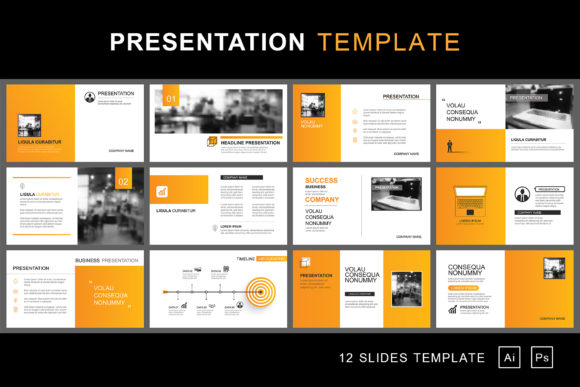
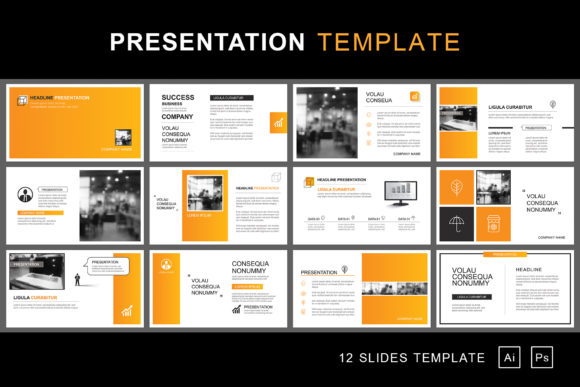
The file structure is organized to respect a designer's workflow. With 12 distinct PSD files included, each measuring 1920 x 1080 pixels, the template is optimized for widescreen presentations and digital monitors. The use of separate layer files means you have granular control over every component. You can isolate a background texture, adjust a text box, or swap out a graphic element without disturbing the rest of the layout. The inclusion of EPS 10 and AI files further broadens compatibility, allowing users of older software versions to still access these high-quality design assets.
Typography That Respects the Message
One of the most practical decisions in Presentation and Slide Template 2 is the reliance on system default fonts, specifically Arial. In the realm of modern typography, there is often a push toward obscure, decorative typefaces. However, for a functional template used across web design, editorial design, and social media graphics, reliability is king. Arial is a robust sans serif font that guarantees legibility across all operating systems and devices. By using a system default, the template eliminates the need for users to purchase expensive commercial fonts just to make the slides work.
This approach significantly improves the readability of your content. Whether you are presenting complex data to stakeholders or writing a persuasive marketing pitch, the text remains clear and unobtrusive. The template demonstrates that you do not need a chaotic mix of a script font and a handwritten font to achieve visual interest. Instead, the hierarchy is established through sizing, weight, and spatial arrangement. This allows the focus to remain on your message and your imagery, rather than on distracting typography.
Practical Applications for Every Creative Professional
The versatility of Presentation and Slide Template 2 is its strongest asset. For small business owners and entrepreneurs, the paper-style aesthetic works exceptionally well for brand identity decks. It suggests that your business is grounded, thoughtful, and detail-oriented. Imagine using these layouts for a packaging design proposal; the textured background complements the tactile nature of physical products, creating a cohesive narrative between the slide and the item being discussed.
For marketers and bloggers, the template serves as a strong foundation for advertising materials. The clean lines and neutral tones make it easy to overlay high-contrast text or bold imagery. You can easily convert the slides into Instagram stories, Pinterest pins, or static web banners. Because the files are fully editable, you can adapt the color palette to match your specific brand identity guidelines in minutes. The structure supports both image-heavy layouts for visual storytelling and text-heavy layouts for detailed reports.
Optimizing Your Workflow with Editable Elements
Time is a non-renewable resource for content creators and hobbyists alike. The value of a premium font or template is often measured by how much time it saves. Presentation and Slide Template 2 is designed for speed without sacrificing quality. The fully editable template elements mean that you can rapidly prototype different ideas. If a specific layout does not fit your needs, you can drag and drop elements from one of the other 12 included files to create a custom hybrid.
When evaluating this template for your next project, consider the "font pairing" strategy. While Arial is the default, its neutral nature allows it to pair beautifully with more expressive typefaces. If you need to add a touch of elegance, you might introduce a serif font for headings while keeping the body text in Arial for maximum readability. This flexibility makes the template a valuable addition to any designer's library. It acts as a canvas that adapts to your creative direction rather than forcing you into a rigid visual style.
Designing for Print and Digital Harmony
Many designers struggle to find assets that work equally well on screen and on paper. Presentation and Slide Template 2 bridges this gap. The 1920 x 1080 pixel dimension is standard for monitors and projectors, ensuring your presentation looks sharp during a meeting. However, the 300 DPI and CMYK settings mean you can confidently repurpose these designs for print materials. A slide can easily be reformatted into an A4 handout, a conference flyer, or a marketing brochure without losing fidelity.
This dual-purpose capability is essential for maintaining a consistent brand identity across all channels. The paper texture background provides a unifying thread that ties digital and physical assets together. When a client sees your screen presentation and then holds a printed leaflet with the same aesthetic, it reinforces your brand’s professionalism and attention to detail.
Final Recommendations for Implementation
To get the most out of Presentation and Slide Template 2, start by analyzing your content requirements. If you are creating a web design mood board, use the minimalist layouts to let the screenshots breathe. If you are designing a creative font showcase or a logo design proposal, utilize the high-contrast areas of the template to make your work pop.
Remember that the photos included in the download are previews intended to show potential. You should replace them with high-resolution images that reflect your specific subject matter. Because the layers are separate, swapping images is a non-destructive process. This template is more than just a slide deck; it is a robust design asset that empowers you to communicate with clarity, style, and professionalism. It is a practical investment for anyone serious about high-quality visual communication.