NEST Powerpoint Presentation Template: Streamline Your Business Growth
In the world of business communication, time is often the most expensive resource. Whether you are a startup founder pitching to investors, a marketer presenting quarterly results, or a creative agency onboarding a new client, the friction of starting from a blank slide is a constant hurdle. The NEST Powerpoint Presentation Template is designed specifically to eliminate that friction. It is not merely a collection of slides; it is a visual strategy tool that combines clean, modern aesthetics with practical functionality to help you save time, save money, and ultimately drive success.
A Modern Design Philosophy for the Professional World
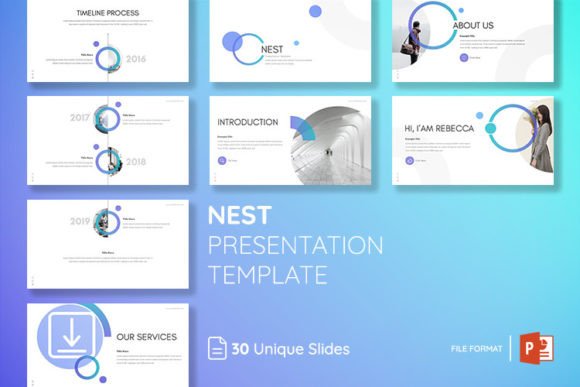
The first thing you notice about the NEST template is its visual restraint. It avoids the cluttered layouts and dated graphics that plague many corporate presentations. Instead, it embraces a modern typography and layout approach that prioritizes clarity. The visual personality of NEST is confident and professional, yet approachable. It uses a balanced grid system that ensures your content breathes, allowing your message to take center stage rather than fighting with the background design.
This template is built on a foundation of sans serif font choices and clean lines, which contributes to a highly legible experience across different screen sizes and projection environments. The overall appeal lies in its versatility; it feels equally at home in a boardroom, a webinar, or a casual team meeting. By utilizing master slides, NEST ensures that every element you place maintains structural consistency, which is a subtle but powerful way to build trust with your audience. When your slides look organized, your audience subconsciously assumes your business operations are equally organized.
Practical Features: From Master Slides to Drag-and-Drop Efficiency
The utility of the NEST Powerpoint Presentation Template lies in its extensive library of assets and its user-centric design. With a total of 150 slides included in the package, you are equipped to handle virtually any business scenario. The package includes 30 core slide designs, expanded across 5 different color themes. This variety allows you to tailor the visual tone to match specific brand guidelines or the mood of your presentation without needing to be a graphic design expert.
One of the most significant time-saving features is the reliance on layouts based on master slides. For the uninitiated, master slides act as the blueprint for your presentation. When you edit a master slide, the changes ripple through the entire deck, ensuring that fonts, colors, and placements remain uniform. This prevents the common issue of "slide drift," where the style changes halfway through a presentation, making it look unprofessional.
Furthermore, NEST is designed for ease of use. The drag-and-drop picture placeholders mean you don't need to wrestle with cropping or resizing images manually. You simply drop your high-resolution photos into the designated area, and the template handles the rest. All elements are fully editable and resizable, giving you total control over the brand identity you wish to project. The inclusion of an Icon Library adds another layer of professional polish, allowing you to visualize concepts quickly without searching for external assets.
Real-World Applications: Who Benefits from NEST?
The versatility of the NEST template makes it a valuable asset for a wide range of professionals. For entrepreneurs and small business owners, this template serves as a lifeline during pitch competitions or investor meetings. A polished deck can often be the difference between securing funding and being passed over. NEST provides that polish without the need to hire a professional presentation designer.
Marketers and content creators will find the template indispensable for social media strategy decks, campaign proposals, and analytics reports. The modern layout supports heavy data visualization while keeping the slides looking airy and digestible. Designers can use it as a starting point for editorial design projects or client mood boards, appreciating the premium font choices included in the free package. Even bloggers and publishers can leverage the slides for media kits, using the graphic design layouts to showcase audience demographics and partnership opportunities effectively.
Typography, Hierarchy, and Audience Engagement
While the template provides the structure, the typography choices within NEST play a critical role in how your message is received. The template utilizes a clean sans serif font that is optimized for screen reading. In presentation design, readability is paramount. Unlike serif fonts, which are often better suited for print design or long-form reading, the sans-serif approach in NEST ensures that your key points are legible even from the back of a large conference room.
Visual hierarchy is another area where NEST excels. Through the use of bold headers, sub-headers, and body text, the template guides the viewer’s eye naturally across the slide. This hierarchy is essential for audience engagement. If a slide is too dense or lacks focal points, the audience disengages. NEST’s layouts force you to distill your information into digestible chunks, which is a best practice for modern web design and presentation logic alike.
Maximizing the Asset: A Guide to Customization
To get the most out of the NEST Powerpoint Presentation Template, it is helpful to approach the customization process strategically. Start by selecting one of the 5 themes color options that best aligns with your existing brand identity. If your brand uses specific hex codes, you can easily input these into the theme settings to ensure the entire deck aligns with your corporate palette.
When incorporating your own content, pay attention to the font pairing suggestions often found in Read Me Documentation. While the template includes free fonts, understanding how to pair a bold header font with a lighter body font can elevate the design. Although this specific package focuses on a clean aesthetic, understanding the contrast between a heavy display font and a readable body type is a skill that translates across all design assets.
Remember that while the template includes photo not include (meaning you must supply your own imagery), this is actually a benefit. It forces you to use high-quality, relevant images that speak to your specific audience rather than generic stock photography. Use the drag-and-drop functionality to test different images quickly. Because all elements are resizable, you can experiment with full-bleed images versus contained graphics to see which better supports your narrative.
Efficiency in Every File
The package is delivered as PPTX Files, ensuring compatibility with Microsoft PowerPoint and other major presentation software. The commitment to being easily and editable means that you spend less time fighting the software and more time refining your message. Whether you are creating a packaging design proposal, a logo design presentation, or a quarterly business review, the infrastructure is already there.
In conclusion, the NEST Powerpoint Presentation Template is more than just a visual aid; it is a productivity tool. It bridges the gap between amateur slideshows and high-end agency work. By leveraging its modern typography, structured layouts, and extensive slide library, you can present your ideas with the confidence and clarity required to bring your company to the next level. Get it now