Streamline Your Strategy with the JOURNEY Google Slides Template
A Clean, Modern Foundation for Business Presentations
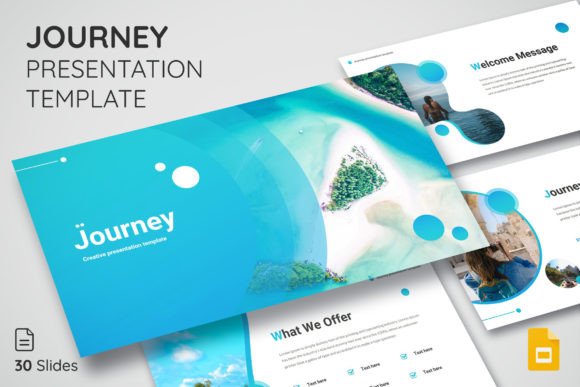
When you're preparing a pitch deck, quarterly review, or project proposal, the last thing you need is to waste hours wrestling with slide layouts. The JOURNEY Google Presentation Template solves that problem with a clean, modern design language built specifically for professional contexts. Its visual personality strikes a balance between minimalism and warmth—structured grids, generous whitespace, and a contemporary sans serif typeface create an atmosphere of clarity and confidence without feeling sterile or corporate in a dated way.
What makes this template stand out from hundreds of generic slide decks is its restraint. Each of the 30 core slides (150 total across five color themes) uses deliberate negative space and thoughtful alignment to guide the viewer's eye. The layouts feel like they were designed by someone who understands visual hierarchy in practice, not just in theory. Whether you're presenting revenue projections, brand guidelines, or a product roadmap, the JOURNEY template gives your content room to breathe while maintaining a polished, professional edge.
Where This Template Works Best
The versatility of the JOURNEY Google Presentation Template makes it a practical design asset across a surprisingly wide range of projects. Entrepreneurs building investor decks will appreciate the structured data layouts. Marketers creating campaign briefs or social media strategy presentations will find the clean typography and editable icon library especially useful. Designers presenting brand identity concepts to clients can use the minimal aesthetic to let their visual work take center stage.
Small business owners preparing internal training materials, bloggers pitching collaboration proposals, and content creators developing course outlines will all find real utility here. The template's modern typography and balanced composition work well for both formal boardroom settings and more casual virtual meetings. Because all elements are fully editable and resizable, you can adapt the same template to a corporate keynote, a creative portfolio review, or a nonprofit fundraising presentation without the final result feeling mismatched.
Practical Design Strengths You'll Actually Use
One of the most valuable aspects of the JOURNEY template is how it handles visual hierarchy. Title slides use bold, confident typography that commands attention. Content slides employ a clear distinction between headings, subheadings, and body text through size, weight, and spacing rather than relying on decorative flourishes. This means your audience naturally knows where to look first, second, and third—which directly impacts how well they absorb your message.
The five included color themes deserve attention. Rather than offering five wildly different palettes, the themes provide subtle tonal shifts that let you match your presentation to specific brand guidelines or mood requirements. This kind of nuance matters when you're building brand identity consistency across touchpoints. A startup with a vibrant brand might choose the bolder theme, while a financial services firm could opt for the more subdued option. The drag-and-drop picture placeholders simplify the process of adding your own photography or graphics, and the master slide architecture ensures that formatting changes propagate cleanly throughout the entire deck.
Evaluating Whether This Template Fits Your Project
Before committing to any presentation template, it's worth running through a quick evaluation. Start by reviewing the slide types included. Does the JOURNEY template offer the right mix of data visualization layouts, text-heavy slides, and image-forward compositions for your specific needs? If you're building a sales deck, you'll want strong chart and comparison slides. If you're creating a brand presentation, image galleries and quote layouts matter more.
Next, consider font pairing possibilities. The template uses a free font (linked in the included Read Me documentation), which is a practical advantage—you won't run into licensing issues when sharing the presentation with team members or clients. The sans serif typeface chosen for the template pairs well with both serif fonts for formal contexts and handwritten fonts for more creative, personal projects. If you need to add a secondary typeface for contrast, look for something that shares similar proportions and x-height to maintain cohesion.
Finally, test the template with your actual content before presenting. Drop in a few real slides—your most text-heavy one, your most data-dense one, and your most image-dependent one. See how the layouts hold up. The JOURNEY Google Presentation Template is designed to be highly editable, so you can adjust spacing, reposition elements, and swap color themes until everything feels right. This testing step takes fifteen minutes and can save you from discovering layout problems mid-presentation.
Getting Real Value from Your Design Assets
Good presentation design isn't about decoration—it's about communication. The JOURNEY template earns its place in your toolkit because it prioritizes readability and structure over trendy visual effects that date quickly. The included icon library adds functional value, giving you ready-made visual elements to break up dense text without resorting to stock imagery that feels disconnected from your message.
For designers and creative professionals, having a reliable, modern typography-driven template on hand eliminates one of the most common bottlenecks in client work: the presentation phase. Instead of building slide decks from scratch every time, you start with a proven foundation and customize from there. That's not laziness—it's smart workflow design. The PPTX file format ensures compatibility across platforms, and the master slide system means your edits stay consistent even as the deck grows.
Whether you're a freelancer pitching new clients, a small business owner training your team, or a marketer presenting quarterly results, the JOURNEY Google Presentation Template gives you a professional starting point that respects both your time and your audience's attention. That combination—saving time while elevating quality—is exactly what practical design tools should deliver.