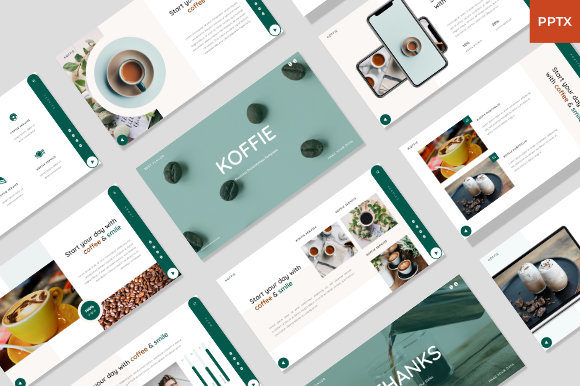
Koffie - Coffee PowerPoint Template for Modern Branding
A Design Asset Built for Visual Storytelling
Finding a presentation template that feels both professional and genuinely creative can be a challenge. The Koffie - Coffee PowerPoint Template solves this by offering a collection of 38 unique slides that move beyond generic corporate layouts. Its visual personality is distinctly modern, fresh, and elegant. You'll notice clean lines, thoughtful use of white space, and a sophisticated color palette that feels warm and inviting—much like a well-crafted cup of coffee. The style is not overly minimalist, but it avoids clutter, striking a balance that makes content feel accessible and high-end simultaneously. This template isn't just a set of slides; it's a design asset that helps you build a compelling brand identity from the first click.
Where This Template Truly Shines
The versatility of the Koffie template is one of its strongest features. It’s built on Master Slides with a 16:9 wide screen ratio, making it ready for modern displays and projectors. The picture placeholder feature is a practical time-saver, allowing you to simply drag and drop your own images into pre-designed frames. This makes it exceptionally useful for a wide range of projects:
- Coffee and Food Branding: Naturally, its aesthetic is perfect for cafes, roasters, bakeries, and culinary businesses. The layouts are designed to showcase food photography beautifully.
- Restaurant and Culinary Businesses: Use it for menu presentations, investor pitches, or internal team training decks.
- Pitch Decks and Marketing Agencies: The creative, modern typography and structured layouts help present marketing strategies, campaign results, or new client proposals with clarity and flair.
- Photography Portfolios and Creative Studios: The elegant design provides a neutral yet stylish backdrop that lets your work take center stage without competing for attention.
- Corporate and Food Profile Presentations: For annual reports, company overviews, or product launches in the food and beverage industry, it adds a layer of professionalism and visual appeal that standard templates lack.
Think of it as a foundation. Whether you're a small business owner putting together a funding proposal, a marketer creating a social media strategy deck, or a designer showcasing a recent project, Koffie provides the polished starting point you need.
Making It Work: Practical Guidance for Your Project
Adopting any new design asset requires a bit of strategy. Here’s how to get the most out of the Koffie - Coffee PowerPoint Template.
Evaluating Fit and Customization
First, assess if its visual personality aligns with your brand's tone. The template's "elegant and fresh" style works wonderfully for brands that value sophistication with a touch of approachability. If your brand is more rugged or hyper-technical, you might need to customize the color scheme heavily. The good news is that all graphics are resizable and editable, and it uses recommended free web fonts, which simplifies the process and avoids licensing headaches. This makes it a commercially friendly choice right out of the box.
Ensuring Readability and Hierarchy
A beautiful design fails if the message isn't clear. When you add your content, pay close attention to the visual hierarchy the template establishes. Use the provided heading and body text styles consistently. The template's layout likely uses a combination of serif and sans-serif fonts to create contrast and guide the viewer's eye. Stick to this system. If you introduce a new script font or handwritten font for accent, use it sparingly—perhaps only for pull quotes or key phrases—to maintain professionalism and readability.
Practical Workflow Tips
- Start with the Documentation: The included documentation file is your guide. Review it to understand the slide master structure and any specific instructions from the creator.
- Plan Your Content First: Before diving into the slides, outline your narrative. This will help you choose the most appropriate layouts from the 38 options available.
- Test Your Images: Since the template is image-forward, ensure your photography is high-resolution and well-composed. The drag and drop placeholders make swapping images easy, but the quality of your visuals will make or break the final presentation.
- Consider Your Audience: If presenting live, the clean layouts help keep the focus on you, the speaker. For a shared deck meant for review, the detailed slides can stand on their own. The modern typography ensures it looks sharp on any screen.
Ultimately, the Koffie template is a tool to enhance your communication. It provides the professionalism and creative spark needed to engage an audience, whether you're pitching a new business idea, showcasing a portfolio, or outlining a marketing campaign. By focusing on your content and leveraging the template's built-in design strengths, you can create a presentation that feels both authentic and impressively polished. Remember, the images in the demo are for preview; your own visuals will bring the final product to life.